Integrated vs. Dedicated Graphics: Choosing the Right Fit

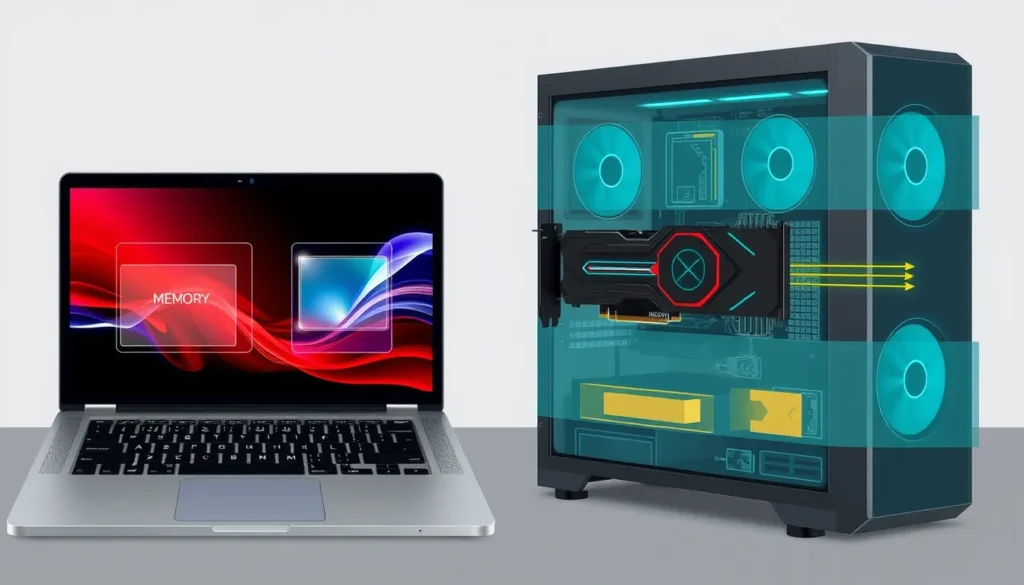
If you are struggling to choose between integrated and dedicated graphics cards, you likely want clarity, not marketing hype. This guide explains the fundamental architectural differences between iGPUs and dGPUs, focusing on how they handle memory and power.
We move beyond raw benchmark numbers to address your specific workload. Whether you need efficient office performance or high-end creative capability, understanding resource allocation helps you make a budget-friendly decision.
By examining shared versus discrete resources, you can identify the right hardware for your needs without overspending on unnecessary power.
The Core Architectural Difference: Shared vs. Discrete Resources
Physical placement defines everything. An Integrated Graphics (iGPU) is physically etched onto the same silicon die as the Central Processing Unit (CPU). It has no separate memory chip; instead, it borrows bandwidth from your System RAM. In contrast, a Dedicated Graphics (dGPU) is a distinct component, usually mounted on its own circuit board. It comes with its own Video Random Access Memory (VRAM), a dedicated memory pool that does not compete with the rest of the computer’s operations.
Think of the iGPU as a shared office desk. You work there, but so does the CPU, meaning you constantly negotiate for space and attention. The dGPU is a private studio. It has its own tools and storage, allowing it to operate without waiting for the main office to free up resources. This isolation is critical for heavy tasks.
It is important to clarify terminology. When we say “integrated,” we mean the graphics processor is built into the CPU chip itself, not merely attached to the motherboard. This architectural distinction dictates how data flows. The iGPU must travel through the memory bus to reach System RAM, creating a bottleneck. The dGPU accesses VRAM directly through a high-speed interface, ensuring data reaches the processing cores quickly. This fundamental difference in resource allocation determines whether your system can handle complex rendering or simple display output.
Memory Management: Why VRAM Matters for Heavy Loads
The distinction between System RAM and VRAM dictates how efficiently your GPU processes visual data. An Integrated Graphics chip shares the same memory pool as the CPU. Every time the iGPU requests texture data or frame buffers, it competes with the processor for available bandwidth. This shared pathway creates contention, slowing down data transfer rates significantly under load.
In contrast, Dedicated Graphics utilize VRAM, a specialized memory type attached directly to the GPU board. This dedicated pool offers higher bandwidth and lower latency, ensuring that massive amounts of texture data and vertex information reach the processing cores without interference from general system tasks.
This speed difference becomes critical in demanding applications. While an iGPU can often decode high-resolution video streams smoothly, it frequently struggles when games require loading large, detailed textures in real-time. The shared memory bottleneck causes texture pop-in, where low-resolution images temporarily replace high-quality ones, or erratic frame rates during complex scenes. A dGPU’s direct access to VRAM maintains consistent performance, keeping textures loaded and frame times stable even when rendering intricate environments. Ultimately, the isolation of video memory prevents the "traffic jam" that limits integrated solutions in high-fidelity scenarios.
Performance Tiers: Matching Hardware to Your Workload
The right choice depends entirely on what you plug into the GPU. For basic productivity, including web browsing, office suites, and streaming 1080p video, an iGPU is sufficient. These tasks demand minimal texture processing and low frame rates, making the cost savings and lower power draw of integrated solutions highly attractive.
Casual gaming presents a middle ground. Many indie titles and older AAA games run smoothly on high-end iGPUs. However, if you play modern blockbusters at medium settings, an entry-level dGPU provides the headroom needed to maintain stable frame rates without relying on aggressive upscaling technologies.
Serious gaming and creative work require a dedicated architecture. 4K gaming, 3D rendering, and professional video editing place immense pressure on memory bandwidth and capacity. For creative professionals, VRAM capacity is often the critical bottleneck. Large scene files and high-resolution assets can easily exceed the shared System RAM limits of an iGPU, causing crashes or severe slowdowns. A dGPU with substantial VRAM handles these large datasets efficiently, ensuring that complex projects remain responsive. This distinction makes integrated graphics a poor fit for workflows where memory capacity directly dictates output quality and workflow speed.
Power Efficiency, Heat, and Form Factor Considerations
Power consumption and thermal output are direct consequences of architectural complexity. An iGPU shares the CPU’s power budget and operates within the same thermal envelope, keeping energy draw low. This efficiency is why ultrabooks, tablets, and fanless devices rely almost exclusively on integrated solutions. The reduced heat generation allows for thinner chassis designs and longer battery life, as the system does not need to divert significant power to active cooling fans.
In contrast, a dGPU is a separate, high-power component. It demands dedicated power delivery and generates substantial heat, requiring robust cooling infrastructure like heat pipes and fans. In desktops, this dictates case size and airflow requirements. In laptops, the trade-off is more pronounced. Mobile dGPUs often consume more power than their desktop counterparts due to efficiency constraints in compact spaces. This increased TDP accelerates battery drain and raises internal temperatures, potentially throttling performance during sustained loads. If your priority is all-day portability and silence, the iGPU’s thermal profile is a decisive advantage. For high-performance mobile workstations, however, you must accept the physical and energy costs of discrete hardware to gain the necessary computational headroom.
Cost and Upgradeability: The Long-Term Value Proposition
The financial landscape differs sharply between these architectures. Integrated graphics are bundled into the CPU cost, eliminating the need for a separate purchase. This results in lower initial hardware expenses, making systems with iGPUs ideal for budget-conscious buyers or general office use. Dedicated graphics, however, add a significant line item to the bill. The dGPU requires its own board, memory, and cooling components, which directly increases the total system price.
Upgradeability represents the second major factor. Desktops equipped with a dGPU offer substantial flexibility. If your workload evolves, you can replace the graphics card with a more powerful model later. This modularity allows the system to adapt to future demands without replacing the entire machine. In contrast, integrated graphics are permanently fixed to the CPU. You cannot upgrade an iGPU independently; you must replace the entire processor and often the motherboard.
For laptop users, the situation is more rigid. Neither iGPUs nor dGPUs are typically upgradeable in portable devices. The decision made at purchase is final. If there is a realistic possibility that you will require higher graphical power in the future, a desktop configuration with a dedicated card provides the necessary long-term value and flexibility. Laptops demand a careful assessment of your current and projected needs, as you are locked into that specific hardware configuration for the device’s lifetime.
Making the Decision: A Practical Checklist
Start by defining your primary workload. If your daily tasks involve web browsing, document editing, or video conferencing, an Integrated Graphics (iGPU) solution is sufficient. It lowers the total system cost and extends battery life, making it ideal for students and office professionals who prioritize portability and efficiency over raw processing power.
Conversely, if you engage in gaming, 3D rendering, or video editing, a Dedicated Graphics (dGPU) is non-negotiable. These tasks require significant bandwidth and memory capacity that shared System RAM cannot efficiently provide. A discrete card ensures smoother frame rates and faster render times, justifying the higher initial investment and increased TDP.
Consider hybrid configurations if you need versatility. Systems with switchable graphics allow the computer to toggle between the iPU and dGPU, using the integrated chip for low-load tasks to conserve energy. While this offers a balance of performance and efficiency, it adds architectural complexity and often comes at a premium price. Evaluate whether this flexibility is worth the cost for your specific use case.
Finally, assess your portability needs. A lightweight laptop with integrated graphics is easier to carry daily. A powerful desktop or heavy gaming laptop with a dedicated card provides superior performance but sacrifices ease of transport. Align your hardware choice with where and how you actually use your computer, rather than chasing benchmark numbers that may not reflect your real-world tasks.
